
Creating Triggers
Creating a Trigger
You can create a trigger in the web interface by navigating to the Smart Capture Triggers page.
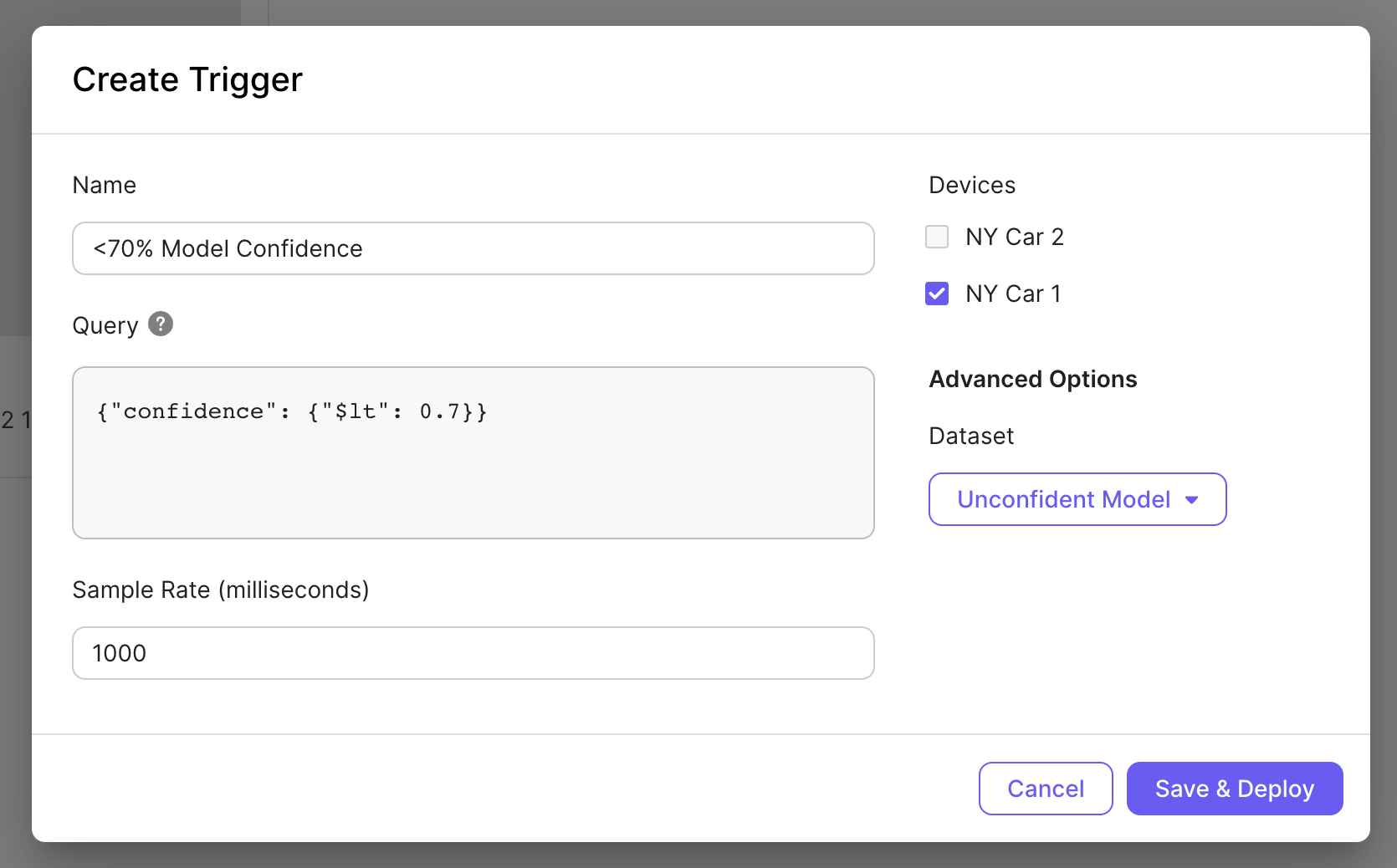
Begin by creating a name for your trigger and creating a SCQL query to be evaluated upon your state conditions. Then choose a sample rate which sets the minimum time that must pass before the trigger can be activated again. Next, pick the devices you would like to deploy the trigger to from your registered devices. Lastly, if you would like to log captured images to Nucleus, choose a dataset to log the images to.
REST API
POST /v1/smart-capture/trigger
Description: Creates a new trigger in Smart Capture.
Body Parameters
| Parameter Name | Required | Description |
|---|---|---|
| name | Required | Descriptive name of the trigger |
| query | Required | Smart Capture Query Language (SCQL) query |
| device_ids | Optional | Comma separated list of device ids to deploy this trigger to. |
| sample_rate | Optional | Number of seconds since last trigger activation to wait before enabling again. |
| dataset_id | Optional | ID of a Nucleus dataset to upload captured data to |
Updated 12 months ago
Did this page help you?